Adaptable Automated Vaccination Analysis & Planning with ARulesXL
Pediatric office software provides electronic medical records, scheduling, billing and services required for the running of a pediatric office. One of the services is forecasting which vaccinations are due and when. Also, schools, camps and local registries require analyses of past vaccination history, showing what was given when and which, if any, vaccinations were invalid.
It has become increasingly difficult to implement and maintain a vaccination planning and analysis module using conventional software technologies due to the large number of complex, interdependent rules and schedules, as well as the continued creation of new combination vaccines that must be dealt with both as a combination and as individual vaccines.
By using a knowledge base to represent the vaccination knowledge, and a reasoning engine that knows how to apply that knowledge, the specification of how and when to vaccinate becomes:
Because the knowledge is specified in a declarative, easy-to-read format, the knowledge can be read and critiqued by vaccination experts, without the need of a programmer.
This article describes a knowledge base implementation that is used to model, maintain, test, and deploy vaccination knowledge.
Knowledge-based approaches to medicine were first developed in the 1970s at Stanford University. In the 1990s a research group from Yale wrote a knowledge base for vaccinations. Yet this technology in general, and for vaccinations in particular, had not been as widely deployed as many had hoped.
The researchers at Stanford probably have the answer. Knowledge bases are of little use without electronic medical records (EMR) to reason over. This is certainly the case with vaccination planning.
It was not until doctors started to use electronic medical records and practice management software that vaccination history became readily available in electronic form. Now that it is, a system like VacLogic becomes both practical and necessary.
The development of VacLogic™ was funded to become a component of Office Practicum™ pediatric practice management software. The power of the approach is reflected in Office Practicum winning the 2005 TEPR (Towards Electronic Patient Records) conference pediatric challenge, in which all other vendors failed to pick up on vaccination errors involving combination vaccines in the test case.
The first generation of VacLogic software was implemented using a logic programming approach. This article describes the next generation of VacLogic software, implemented using an Excel™ rule-based product, ARulesXL™.
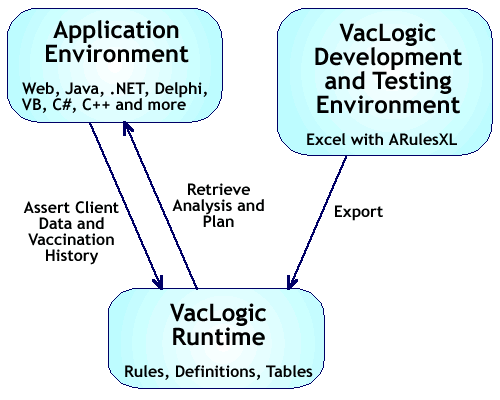
VacLogic uses the familiar Excel interface for the development, testing and maintenance of the vaccine knowledge. The knowledge can then be exported and deployed in any application environment.
The VacLogic development environment allows you to run test cases to see the retrospective analysis and planning reports. The main VacLogic menu provides tools for various inputs, saving and creating test results, running regression tests and exporting the knowledge base for deployment.
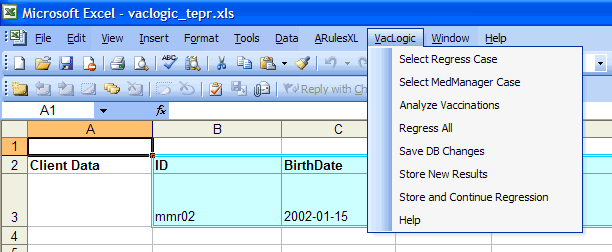
The inputs are:
The inputs can be entered directly in the VacLogic user interface worksheet, or can be extracted from the VacLogic test database, or can be extracted from a live database.
The following screen shot shows inputs from the test case mmr02 in the VacLogic test database. It is just considering the MMRV family of vaccines, which is measles, mumps, rubella and varicella. The case in particular has an alternate spelling of MMR given two months before the minimum age of one year, and a varicella given two months after one year. The age of the client is one year three months.
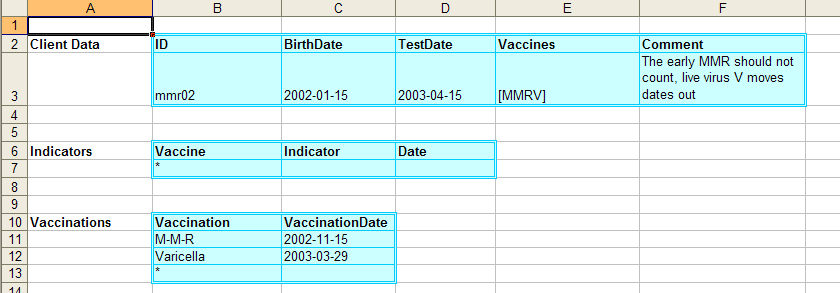
The definitions for this run are set so that the retrospective analysis is given for the individual antigens, measles, mumps and rubella, rather than for the combo vaccine MMR which has all three. The history will note that each is invalid because the MMR was given too soon.
Varicella, on the other hand, was given after one year, so it is OK.
Here is the portion of the user interface that displays that history. Note that it also records the age, as well as the date, for easy verification of the results.

For planning purposes, the combo MMR is considered rather than the individual antigens. The system can be set up to provide both or either. Varicella and MMRV are also reported for planning purposes.
Because the first MMR was given early, it didn't count, and the client's next dose of MMR will be #1. Varicella is complete, and, because varicella is complete, MMRV should not be used for this client.
The planning report below shows that information, along with these dates for vaccines that are due:
This test case works with MMR and varicella. Because both of these are live virus vaccines, there are additional date constraints based on the requirement that there be a four week spacing between any live virus vaccinations. This is reflected in the delayed dates for the next MMR dose, as four weeks must be allowed after the varicella vaccination.
VacLogic uses terms for the status that reflect the relationship between the test date (maybe today) and the planning dates:
Note that the Excel user interface provides the ages as well as the dates, which makes it easy to verify the correctness of the recommendations. Here is the output for the plan:

This user interface makes it very easy for the experts to try various scenarios and corner cases to see how the knowledge base is performing. For example, the case just shown could be modified so that the child was born three months earlier, to see how that would affect the results.
Regression testing is used to determine whether changes to the knowledge base have 'broken' any of the test data results. By storing the correct answers along with the data in the test database, the old test cases can be rerun and the results compared with the previous ones to see if anything has changed.
For example, suppose an incorrect change was made to the standard schedule for MMR, and the end of the recommended age range was set to 20 months, instead of 16. This change to the knowledge base would look like:

On running the old test cases, the differences between stored results and newly calculated results are displayed in the user interface. Here is how the above erroneous change would affect the results:
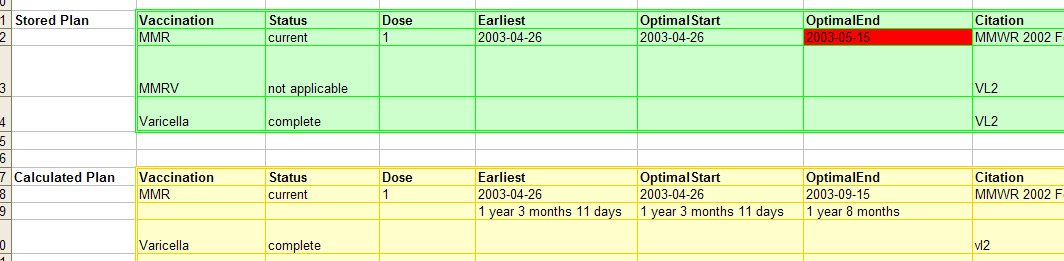
Note that only the cell with changed data is flagged in red. This makes it easy to verify the knowledge base is working correctly after changes have been made, and if there are errors, to quickly determine where they occurred.
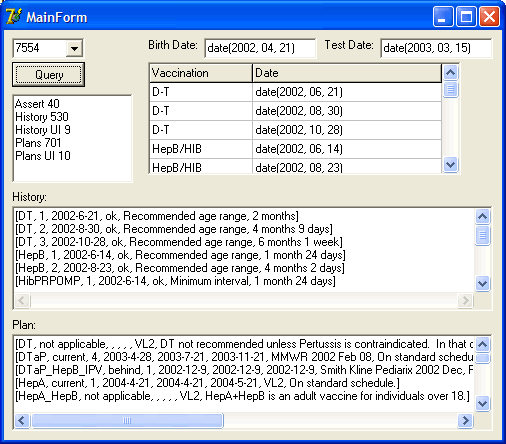
The ARulesXL export capability creates a compiled version of the knowledge base that can then be used from other application environments (Java, .NET, Delphi, etc.) using the ARulesXL application program interface. The following screen shot shows a simple Delphi™ example that provides inputs for a test case and gets the retrospective analysis and planning results in comma delimited format. These, of course, could then be displayed in any fancy application interface, as they are when used with Office Practicum.
Vaccination knowledge is specified in three forms:
Definitions, for example, specify which vaccines are used for retrospective analysis, such as measles; which vaccines are combinations, such as MMR which contains measles, mumps and rubella; which vaccines are live virus; which vaccines are used for planning, such as MMR; and what the synonyms of a vaccine are, such as M-M-R for MMR.
Schedules are represented as tables, giving the dose number, the minimum age the dose can be administered, the minimum interval from the previous dose, and the recommended age range for the dose.
Schedules can be simple, such as the two dose MMR schedule, or complex with many variations such as with Hib or PCV each of which has multiple schedules depending on when the sequence is started and whether or not it was interrupted.
The rules determine which schedule to use when there are multiple options. They also determine the status of a vaccination when it isn't covered by the schedule. Rules indicate when a vaccine is not-applicable, or when a schedule is complete. MMR is complete when there are two or more valid doses, but MMR is also complete if the individual components are complete.
Rules cover special cases, such as MMR, because it's a live virus, must maintain a minimum separation from other live virus vaccinations. DT (diphtheria and tetanus combination) should be used instead of DTaP (DT and pertussis) when it's the fifth dose and the child is between 6 and 7 years old.
ARulesXL allows for the integration of rules and reasoning with spreadsheet calculation. The VacLogic development, test and maintenance environment is an Excel workbook using the ARulesXL add-in. It contains a number of worksheets:

The definitions are used to drive the rest of the system. They specify:
Here are the definitions in the system at the time of writing this article.
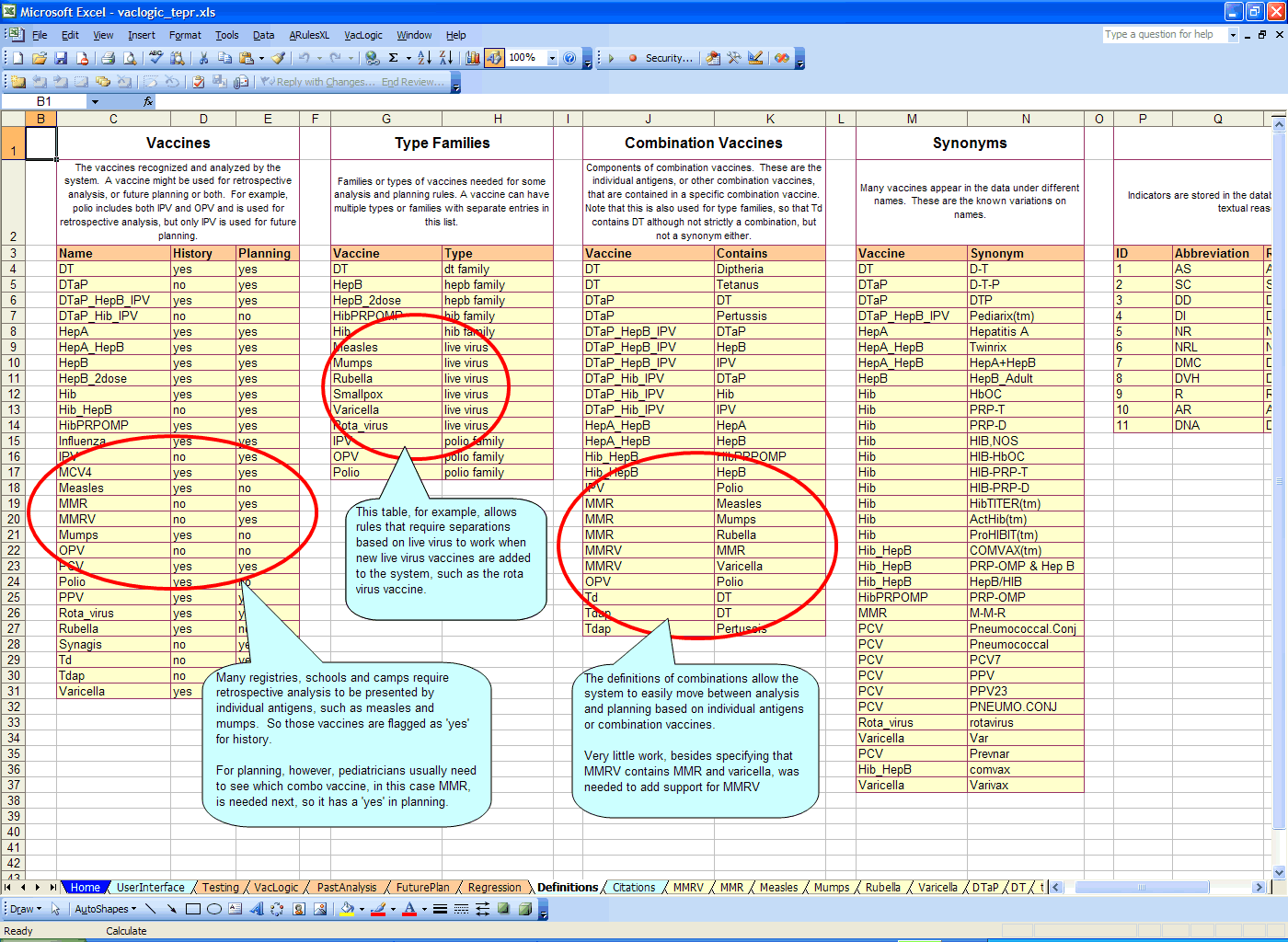
Click on image to see details
ARulesXL rules primarily specify the conditions under which a property or object/property takes a value. Properties are indicated by a leading period. For example, varicella scheduling is different for adolescent and preadolescents. The two rules below set the property .adolescent based on the property .age.

Rules are modularized into rule sets, so these .adolescent rules are part of the Varicella rule set, stored on the Varicella worksheet. Other vaccines might have adolescent factors as well where the age is different than that used for varicella, so they would have their own rule specifications for .adolescent.
Each vaccine is represented by a rule set. Those rule sets need to provide information for both retrospective analysis, and planning.
For retrospective analysis, a rule set needs to be able to return an array property, .schedule. .schedule has two dimensions, for dose and column, where the column might be the minimum age, the minimum interval or the lower or upper limits of the recommended range.
This information is usually derived from an Excel table on the worksheet. Below are the rules that set the .schedule array elements for MMR, based on a table in the MMR worksheet. The question marks indicate pattern-matching variables, so, for example, the analysis rules can ask for MMR:.schedule[2, 'Minimum Age'] to determine if the second dose was given after the minimum age.

Planning is more complex, and requires that a rule set return a number of properties for a vaccine. These are: .status, .nextdose, .mindate, .recdate1, .recdate2, .comment and .citation.
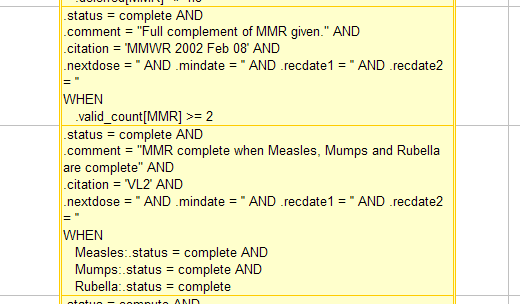
Each vaccine rule set has rules that set each of these properties. Sometimes, the date properties aren't necessary, such as when the status is 'not applicable' or 'complete'.. Here are the two cases when MMR is considered complete. Note that the MMR rule set can refer to the measles, mumps and rubella rule sets to see what their status is.
The date properties are set using the schedule. For example, The minimum date, .mindate, is the earliest date at which a vaccine can be given. It is the maximum of:
The same is true for the beginning and end points of the recommended range.
Here is a rule from the DTaP rule set that covers the general case of scheduling DTaP doses. Similar rules are found in most rule sets. It uses the schedule table to get the date parameters for a vaccine.
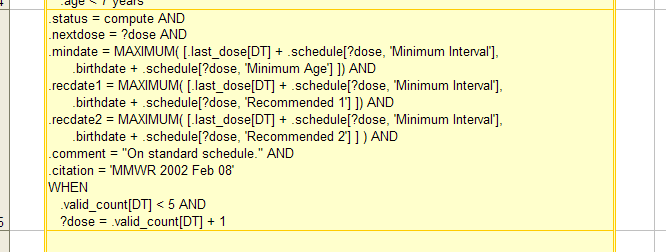
Notice that the .status is 'compute'. This is because the rule can determine the date properties for the vaccine, but whether the client is due, past due, not yet eligible, etc. depends on comparing those dates to the date in question, which might be today's date for a child in the office today.
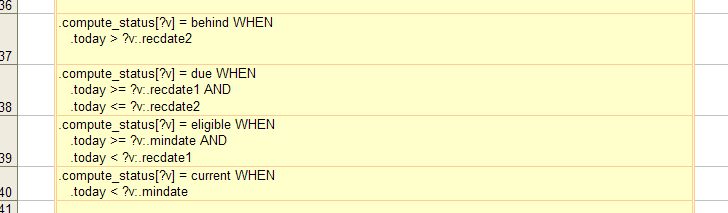
The rules for computing the status from the date are in the common rules for planning, and they can be applied to any vaccine.
You might notice that the first MMR complete rule above depends on a property .valid_count[MMR]. This property is part of the common properties defined in the retrospective analysis rule set. This rule set has general pattern matching rules that are used to set properties that can be used for any vaccine.
The .valid_count[ ?vaccine ] property is set based on counting the number of doses given of a particular vaccine that were valid. It in turn relies on other generic properties, such as the array .doses[ ?vaccine ] which has all the dates of doses for a given vaccine. There are a number of similar generic properties that can be used in the vaccine specific rule sets, such as MMR above.
Because these are generic rules, when a new vaccine, such as rota virus is added to the system, it's rule set can immediately use the property .valid_count[ Rota_virus ] in it's rules.
Unlike the specific vaccine rules that are intended to be easily read and maintained directly by trained pediatricians, the generic rules use pattern matching variables and are not expected to change much. They are maintained by individuals with more programming experience.
Here, for example, are some of the generic rules used to determine the status of a particular dose of a particular vaccine. Note that the vaccine, represented by ?v in the rules, is used to refer to vaccine specific rule sets to get pertinent .schedule data for determining a dose's status. X means the dose was invalid, OK means it was OK. The cell with the # is a comment. Note also the first rule, which tests live virus vaccines against the array of doses including all live virus vaccinations for the client.
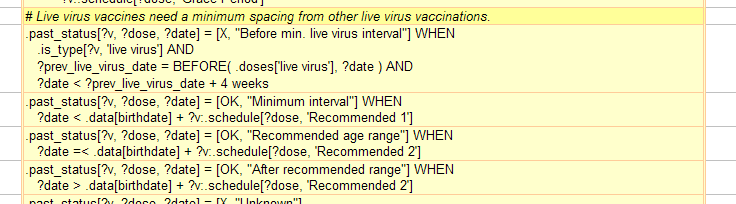
These status rules are used in the retrospective analysis, but are also needed to determine the valid doses of a given vaccine. So the planning rules make use of the valid dose information, which is derived by comparing the actual doses against the schedule for a given vaccine.
Here are the common planning rules used to compute the status based on the dates for a vaccine and today's date:
MMR is relatively simple and the rules and schedule for it are likewise simple. They are expressed similar to how they appear in the vaccination documents of MMR. MMR is a combination vaccine and that is expressed in the definitions.
Hib, on the other hand is very complex, with different rules for Hib with PRP-OMP and without it, and different schedules for late starts and interrupted schedules. Like measles, mumps and rubella, Hib can be component of combination vaccines, which is specified in the definitions.
Like the rules for MMR, the rules for Hib are no more complex than the specifications in the vaccine documentation. If you can read and understand the Hib specifications, you can read and understand the Hib knowledge as coded in VacLogic. This makes it possible for vaccine experts to read and critique the knowledge in the system without the aid of a programmer.
Here is the full set of rules used for MMR. Note that:
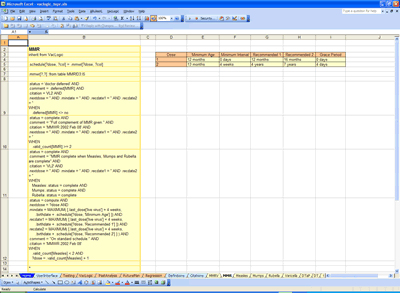
Click on image to see details
Here is a section of the Hib module that deals with interrupted schedules. Note that there are a number of schedules to choose from, and rules which determine which schedule to use under which conditions. The complexity of this knowledge in VacLogic is no more complex than you would see in the DHS document on Hib.
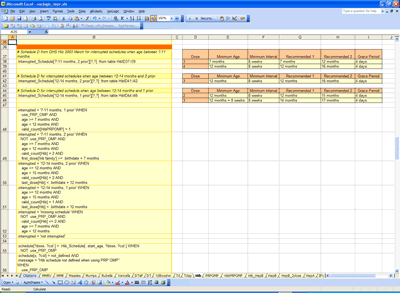
Click on image to see details
Issues involving combination vaccines with Hib are handled with the definitions shown earlier, just as they are for the MMR examples used previously.
MMRV is a combination vaccine that has MMR, itself a combination, and varicella. This is a recent addition to VacLogic.
To incorporate this new vaccine three changes were made:
The definition tables were all that were necessary to correctly capture and record MMRV vaccinations and provide the proper analysis, for example, of measles vaccination history.
The new rules made use of the existing MMR schedule, and just needed some additional information as to when MMRV would be used instead of MMR.
Here is the new MMRV module:

VacLogic is a powerful tool for developing, maintaining, verifying, and testing vaccination knowledge. It allows for the increased complexity of modern vaccines and combinations and can quickly and efficiently be updated as new vaccines and recommendations are developed.
Because the knowledge is expressed in tables, schedules and rules that are very similar to the way the knowledge is expressed in papers describing vaccines, it can be easily read, critiqued and, in some cases maintained, by experts in vaccination, rather than by programmers.
The built-in regression testing ensures that changes do not destabilize the past performance of the knowledge base.
ARulesXL is a trademark of Amzi! inc. VacLogic is a trademark of Amzi! inc. and Visual Data LLC. Excel is a registered trademark of Microsoft. Delphi is a registered trademark of Borland.