Rules
Diagnosing a Problem
knowledgewright4/samples/basic/tutorial/diagnose_1.kb
Next we'll build a simple technical support application with a few simple rules.
The goal of the system will be to determine what the problem is.
KnowledgeWright groups rules that deduce values for the same fact in rule_sets.
Set the Goal to 'problem'
- Edit the knowledgebase object, main, to have a goal of problem,
just as in earlier parts of this tutorial.
Create Rules for Determining
the Problem
Each rule object in KnowledgeWright Basic contains a number
of individual rules, each of which might be used to determine the value
of a fact. So in this case, we'll create a rule_set object, named problem,
which will have rules that can be used to determine a value for problem.
- Use Object/New to create a new rule_set object, with a name of
problem.
- In the type field, select single_value.
- In the rule editor, select Row/Add. You'll see a blank row beneath the
headings for conditions and value.
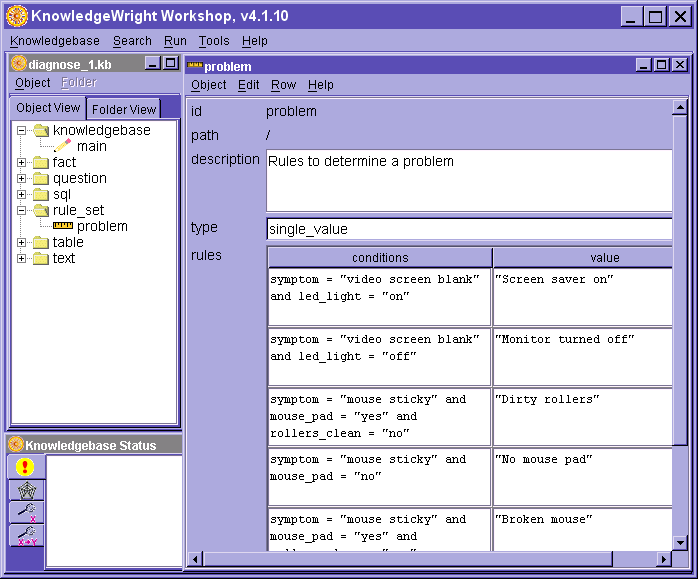
- Enter these conditions for the first rule: symptom = "video screen
blank" and led_light = "on".
- Enter this value for the first rule: "Screen saver on".
- Select Row/Add for another row for another rule.
- Enter condition: symptom = "video screen blank" and led_light
= "off".
- And value: "Monitor turned off".
- Repeat for the following conditions and values:
- condition: symptom = "mouse sticky" and mouse_pad = "yes"
and rollers_clean = "no".
- value: "Dirty rollers".
- condition: symptom = "mouse sticky" and mouse_pad = "no".
- value: "No mouse pad".
- condition: symptom = "mouse sticky" and mouse_pad = "yes"
and rollers_clean = "yes".
- value: "Broken mouse".
- The screen should look something like:
Checking the Knowledgebase
The status window at the bottom of the screen provides two tools for analyzing
the connections between knowledge objects.
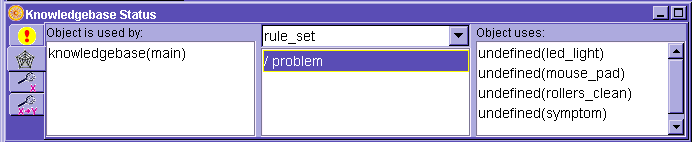
- The tab with the web on it shows how a given object is linked to other objects.
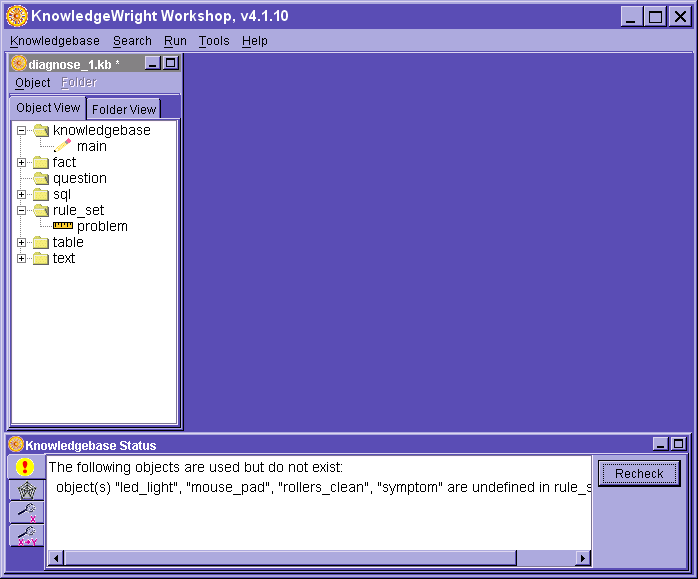
- The tab with the red exclamation mark, shows any links that are undefined,
or circular in a knowledgebase.
In this example we have so far created a knowledgebase main object
that has as a goal problem, and a rule_set problem that
has conditions that refer to other, as yet undefined facts.
Click on the exclamation mark tab to see any problems in the structure of the
knowledgebase, and you will see a screen like the following:
and the other status tab looks like this:
Adding the Questions
We will get values for the four undefined facts by asking the user. So we need
to define question objects for each of them.
Using the Object/New menu, create four questions objects with these attributes:
id
|
symptom
|
path
|
/
|
prompt
|
What symptom are you experiencing?
|
question_type
|
menu_single_choice
|
question_style
|
listbox
|
choices
|
video screen blank
mouse sticky
|
default
|
|
ask_also
|
|
id
|
led_light
|
path
|
/
|
prompt
|
What is the state of the video LED light?
|
question_type
|
menu_single_choice
|
question_style
|
listbox
|
choices
|
on
off
|
default
|
|
ask_also
|
|
id
|
mouse_pad
|
path
|
/
|
prompt
|
Are you using a mouse pad?
|
question_type
|
menu_single_choice
|
question_style
|
listbox
|
choices
|
yes
no
|
default
|
|
ask_also
|
|
id
|
rollers_clean
|
path
|
/
|
prompt
|
Have you recently cleaned the rollers?
|
question_type
|
menu_single_choice
|
question_style
|
listbox
|
choices
|
yes
no
|
default
|
|
ask_also
|
|
Exercises
- Run (using Run/Run menu item) using a variety of responses.
- Notice that the system only asks the detailed questions that are necessary.
- Look at the trace in lower left panel for each, to understand how the
system worked for each set of answers.
- Use Run/Log Detail to change the amount of trace
output. Use the high setting to see exactly how the system works. Use
medium or low to get a better overview. (We recommend medium for most
use.)
Copyright ©1996-2002 Amzi! inc. All Rights Reserved. Amzi!,
KnowledgeWright and WebLS are registered trademarks and Subscription Plus and
Logic Server are trademarks of Amzi! inc.