

amzi.com 9/12 12:40
Amzi! Prolog + Logic Server is now open source! and funded by sales of Dennis Merritt's books.
Dennis Merritt's books are available for Kindle and in print. In addition to his two classic Prolog books, he's written two others, one an introduction to the theory of jazz chords using the baritone ukulele as an instrument, and the other about the similarities between life and quantum entanglement. |
Amzi!
Sign-up for the
Amzi! Newsletter
Amzi! provides software and services for knowledge-based application development and deployment.
- Open Source Projects— All Amzi! products are now open source projects.
- Amzi! Prolog + Logic Server ™ — Embeddable, Extendable, Portable Prolog Implementation
- ARulesXL™ — Excel Rule Engine
- Adventure in Prolog™ — Prolog Tutorial
- Expert Systems in Prolog™ — Applications of Prolog
- Knowledge Wright™ — Customizable Knowledge-Based Tool
Amzi! Open Source Projects ™
Amzi! Prolog + Logic Server is now Open Source.
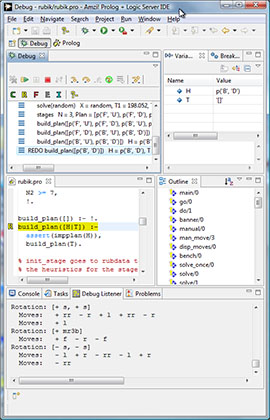
Amzi! Prolog source code debugger showing call stack, variable bindings, source code at a REDO port, index of predicates, and executing code.
Amzi! Prolog + Logic Server ™
Amzi! Prolog + Logic Server™ is an embeddable, extendable, highly portable implementation of ISO standard Prolog, including full support for ISO modules enabling large-scale application development. It is distinguished by:
- Logic Server API: full interfaces for both calling in and calling out from Prolog from a wide variety of development environments including C, C++, Java, Delphi, .NET, VB.
- Eclipse IDE featuring: source code debugger, cross reference, integrated listener, project support and all of the professional development features of Eclipse. Ideal for both learning Prolog and for building commercial grade applications. Amzi!'s strong Java interface made it possible to integrate intelligent Prolog debuggers, cross reference, and other features in the Eclipse Prolog plug-in.
- Virtual machine architecture allows binary code independence. Develop on Windows, deploy on Unix.
Go straight to download.
Adventure in Prolog ™ — Prolog Tutorial
A full tutorial for learning Prolog, using an interactive fiction game for it's basic example. In the course of the tutorial you will also build an expert system and a business application.
Expert Systems in Prolog ™ — Applications of Prolog
A tutorial with many samples showing how to use Prolog to create rule languages and reasoning engines for a variety of different types of knowledge and application.
Knowledge Wright™ — Customizable Knowledge Base Tool
Knowledge Wright is a customizable platform for creating domain-specific application development tools
Knowledge Wright was made possible by the expressiveness of the Prolog language for the development of knowledge based languages and reasoning engines, and Amzi!'s Logic Server API which allowed for the seamless integration with a Java-based development environment.
Copyright © 1995-2016 Amzi! inc. All Rights Reserved.
Amzi!, Logic Server, ARulesXL, KnowledgeWright, Adventure in Prolog, Building Expert Systems in Prolog, are trademarks of Amzi! inc.
Flying squirrel photo Copyright © Joe McDonald